
Our Happy Client Assistants at the front desk are there for you daily with a smile during opening hours.
Officenter is secured with an alarm and equipped with video surveillance.
Officenter is accessible through the main entrance(s) from Monday at 8:00 a.m. through Thursday at 5:30 p.m. and on Friday from 8:00 a.m. through 5:00 p.m. Outside these hours, an electronic access control system is activated, and only users with a personalized badge may enter the building. Only clients with a permanent office at the location are issued an access badge. The common areas at Officenter are equipped with video surveillance and an alarm system. If a user triggers the alarm by improperly using the emergency exits or entering restricted areas equipped with alarms, a fee may be charged for this (additional patrol by the security company).
intercom
If you wish to receive visitors after hours, they can reach you directly through the outside telephone.
Outside at the main entrance you will find the outside telephone/parallel with a phone list of the permanent offices and meeting rooms. Visitors can call your office outside office hours and you can use the "open door" button on your phone to open the outside door. For security reasons, it is recommended that you pick up your guests at the front door outside office hours.
Emergency Doors
The emergency doors are permanently under alarm. When opening one of the emergency doors, the alarm will sound and the alarm center will be notified. The emergency doors may only be used in case of an emergency.
The windows are also under alarm between 10 p.m. and 7 a.m. and thus may not be opened during this period. If the windows are opened during this time period, the alarm will sound and our security firm's monitoring center will be notified.
Cameras
Officenter has cameras installed in the common areas. These recordings remain available on our server for 30 days.
G4S round
A patrol from G4S checks the building every night to see if there is anything suspicious, if any windows are open... The G4S employee has access to the building with a badge.
A color copier is available at reception and on each floor. You can only use it with a personal code, which you can obtain from our Happy Client Assistants.
The copier can also be used for scanning and printing. The paper is refilled daily by us. If the trays are empty anyway, just give us a call and we will immediately refill the empty paper trays.
Please lower the copier lid at all times. This will keep the glass plate protected.
To install the printer, we will be happy to help you or you can obtain a manual at the reception desk.
Copy
Scan
Fax to mail
Officenter has its own fax-to-email system. As soon as a fax is sent or received, it is converted into an email.
You have the option of using the general Officenter fax number (emails are forwarded only during business hours) or having your own fax-to-email number.
| Franking/mailing | will be charged 1/1 |
| Scans | €0.02/piece |
| Copies | €0.06/piece |
| Color copies | €0.16/piece |
| Tel. interior | €0.06/ min |
| Tel. Abroad from | €0.06 to €0.60/min |
| White board marker / 4 pieces | €4.25/4 pieces |
| White board marker | €1.25/piece |
| Brown cover with | €0.68/piece |
| bottom Brown cover | €0.68/piece |
| with padding Postpack box | €2.5/piece |
| large Postpack box small | €1.5/piece |
| Plastic folder | €0.57/piece |
| Office maintenance (additional request) | €26.25 / hour |
| Handyman service | € 30.00 / hour |
| Polishing windows | €6.25 / piece |
| Secretarial Services | € 35.00 /piece |
| Archive boxes | € 3.50 / piece |
| Binding booklet (wire-o/ring system) | € 2.85 / piece |
| Labels | €0.06 / piece |
| Label sheet Long | € 3.00 / piece |
| Telephone cable | €7.25 / piece |
| Plastify | € 0.50 / leaf |
| Pack of A3 paper | € 15.00 / piece |
| Pack of A4 paper | €6.75 / piece |
| White cover | €0.15 / piece |
| Brown cover | €0.57 / piece |
| Installing IT equipment (server) in our rack | €25.00 / hour / month |
| External WAN IP | €10.50 / month |
| Wi-Fi within the company's own network (VLAN) at its own location | free |
| Additional cabinet | € 10.00 / month |
| Archive rack rental | € 15.00 / month |
| Outdoor advertising Hasselt (excl. creation/placement) | €74.50 / month |
| Outdoor advertising other sites (layout/creation/placement/use) | € 45.00 / month |
| Guarantee badge | €28 each |
| Refill key office | € 27.50 / piece |
| Refill key office | € 44.50 / piece |
| Ironing service | Service vouchers |
Convenient for short trips; good for your health as well as your carbon footprint.
A few points to note:
Officenter is not liable for injury to other people (traffic accident) while cycling.
This must be covered by your business liability insurance.
Officenter is not liable for any physical injury or property damage sustained by the cyclist.
This must be handled through your workers' compensation insurance or personal accident insurance.
If you cause damage to our bikes, Officenter reserves the right to recover the cost of that damage. So please ride carefully. And be sure to always lock the bike and secure it to a fixed point to prevent theft.
Professional Ironing Service at Officenter
At Officenter , you can easily take advantage of our professional ironing service, which is specially tailored to our customers’ convenience. Come to work in the morning with a basket full of laundry and walk out in the evening with all your clothes, perfectly pressed down to the last detail. Every garment is handled with the utmost care and returned to you perfectly pressed and wrinkle-free within 48 hours.
Payment is simple and cost-effective via service vouchers, allowing you to enjoy complete peace of mind, more free time, and laundry that’s always neatly ironed—without any hassle.
Officenter guarantees quality, reliability, and a smile—every single day.
Do you have any questions about this service? Our Happy Client Assistants at every location will be happy to help you.
Benefits@Officenter offers our customers and their employees a wide range of benefits and discounts both at home and abroad. You can easily register on the platform for free using your email address. Once you have an account, you can start taking advantage of the discounts right away, anytime, anywhere.
Visit https://officenter.benefitsatwork.be/
The discount method may differ for each benefit: online with a promo code on a web shop, by displaying a (mobile) coupon in a store, through an online ticket shop....
We regularly add new discounts to the program.
Don't want to miss a discount? Then sign up for the monthly Benefits@Work newsletter!

Kitchens
Each kitchenette is equipped with Officenter —cups, saucers, cutlery, towels, dish towels, etc.—from the kitchen cabinets, which you are free to use. Since everyone enjoys a clean kitchen, we ask that you please place dirty cups, saucers, cutlery, etc., in the dishwasher and leave the countertop tidy. The kitchen is cleaned daily, and the refrigerator is completely emptied every Saturday. A microwave, coffee maker, and electric kettle are also available for your use.
Showers
You are free to use our showers. These are located on the 2nd floor directly opposite the stairs. Please leave the showers tidy after use.
Smoking
Smoking is prohibited in the buildings at Officenter, but we have a nice smoking area that you are welcome to use.
Pets
Pets are not allowed in the building.
Catering
Catering is provided exclusively by Officenter.
Waste Management
The bins in the offices are emptied by default every Saturday. If you would like to have them emptied in between, you can put them in front of your office at the end of the day and the cleaning lady will empty them in the evening. There are also bins in the communal kitchens where you can sort your waste.
Data safe paper shredding
We have a container in which you can deposit your confidential documents for destruction. This is collected 1x month for destruction.
Flexrelax
Our Flexrelax is the perfect place for a short power nap or a brief moment of relaxation in the massage chairs.
Our common areas are cleaned daily. If you do
defects (broken lamp, toilet keeps running, towel roll is
out...) please report it to reception.
The Flexrelax is located on the 2nd floor, next to the Flex Office No. 6.
In case of emergency
Emergency numbers are posted at the entrance, at the reception desk and also on each floor.
Reception during business hours (8:30 a.m.–5:30 p.m.) +32 53 51 02 00 (9001)
Emergency Medical Service - Fire Department - Police
Aalst police: 112
Our Lady Hospital: +32 53 73 27 27
Our Lady Hospital Emergency Room: +32 53 72 42 48
ASZ Hospital: +32 53 76 41 11
Emergency Exit
Emergency exits in Aalst are located opposite the elevator at the stairwell both on the left and right sides of the building.
AED Device + First Aid:
The AED machine + first aid kit are located in the entrance hall. If there are any known medical problems we should be aware of, please notify the reception desk.
Parking Policy
Parking spaces for electric cars
Officenter has electric charging stations. May we ask you to move your car once charging is complete, so that other Officenter customers also have the opportunity to charge their cars?
If you are driving an electric car, please be added to the Whatsapp group by the ladies at the reception. This way the users can reach each other more easily if the car needs to be moved or if you need a cable.
Letterbox
A mailbox is provided to each user. The number and key are given to you by the Happy Client Assistant. Each morning the mail is distributed to these boxes.
Franking
We frank all your correspondence. This cost is charged 1/1 on your monthly bill. You can deposit your letters in the designated mailboxes PRIOR and NON PRIOR at the reception desk. Letters deposited before 3 p.m. will be sent the same day.
You can also deposit your registered mail and kilo mail with us.
Always mention a sender on your shipments. This is required by the postal service.
In case of a large mailing, please deposit the items to be sent in time at the reception desk.
Collection
Mail is picked up around 3 p.m. daily.
Postal proxy
To avoid having to be present every time the mailman comes with registered mail for you and to save you the trip to the post office, we want to sign out and receive your registered mail for you.
If you wish, all you need to do is fill out the document "request for a flex postal proxy card." You can also do this online: www.bpost.be.
A flex mail proxy means that several people can accept your mail if they can present this card. You must present the completed document along with a copy of your passport at the post office or follow the procedure online.
We will be happy to help you with this!
Mail Room
Officenter Aalst has its own mailroom: a separate, secure area where incoming and outgoing packages are stored efficiently and can be picked up safely.
What can you expect?
Every mailroom is equipped with:
Access
Customers with a badge (permanent office customers and Coworking Fix customers) have access to the mailroom. Our Happy Client Assistants (HCAs) also have access (for example, for customers without a badge).
How does it work for incoming packages?
Parcel delivery drivers (Bpost, DHL, UPS, FedEx, PostNL, etc.) should check in at the front desk.
Our team will register the parcel and affix a yellow sticker with a unique number. You will receive an email as soon as your parcel arrives.
Parcel delivery drivers then place the parcel in the mailroom (on the shelf for delivered parcels).
You can then pick up your parcel yourself from the mailroom using your badge.
Please let the reception desk know when you’ve picked it up so we can close out the registration.
Call Answer
You can answer a call in several ways:
Call number
You can dial a number in several ways:
Transfer call with callback
While the call is in progress, press Transfer (16.). Dial the number to which you want to transfer the call and press Dial (20.). If the person you wish to transfer to is busy, you can easily retrieve the call by pressing the flashing Line key (12.).
Transfer call without callback
While on the call, press transfer (16.). Dial the number to which you want to transfer and press transfer again. The call is now forwarded immediately and without call back. If this extension does not answer the transferred call within 20 seconds, the call will automatically be routed back to your extension (return call).
Hold
By pressing the hold button (5.) you put a call on hold temporarily. You can then talk to a colleague while the other party listens to hold music. You can also transfer the caller from the hold function.
Pickup
You can answer an incoming call on another extension (e.g. your colleague's extension) by pressing *8 followed by KIES or by pressing Pickup (21.), The prerequisite is that this colleague's extension is in your pickup group. Pickup and calling groups are set up by your system administrator.
Hands-free/headset:
By means of the handsfree key (13.) you can direct a call from the handset to the handsfree speaker. If a headset is connected, it may be possible to switch between headset and handsfree by repeatedly pressing the key.
Microphone on/off
With the microphone key (7.), without putting the call on hold, you can briefly deactivate your microphone. In this case, the other party cannot hear you, but you can hear them. Pressing the microphone key again deactivates this function.
Line keys
While making a call, you may receive a second call. You can accept this by pressing the corresponding flashing line key (12.). Your current caller is then placed on hold (music). You can switch between calls by pressing the corresponding line key (L1 or L2). Each station can also be transferred.
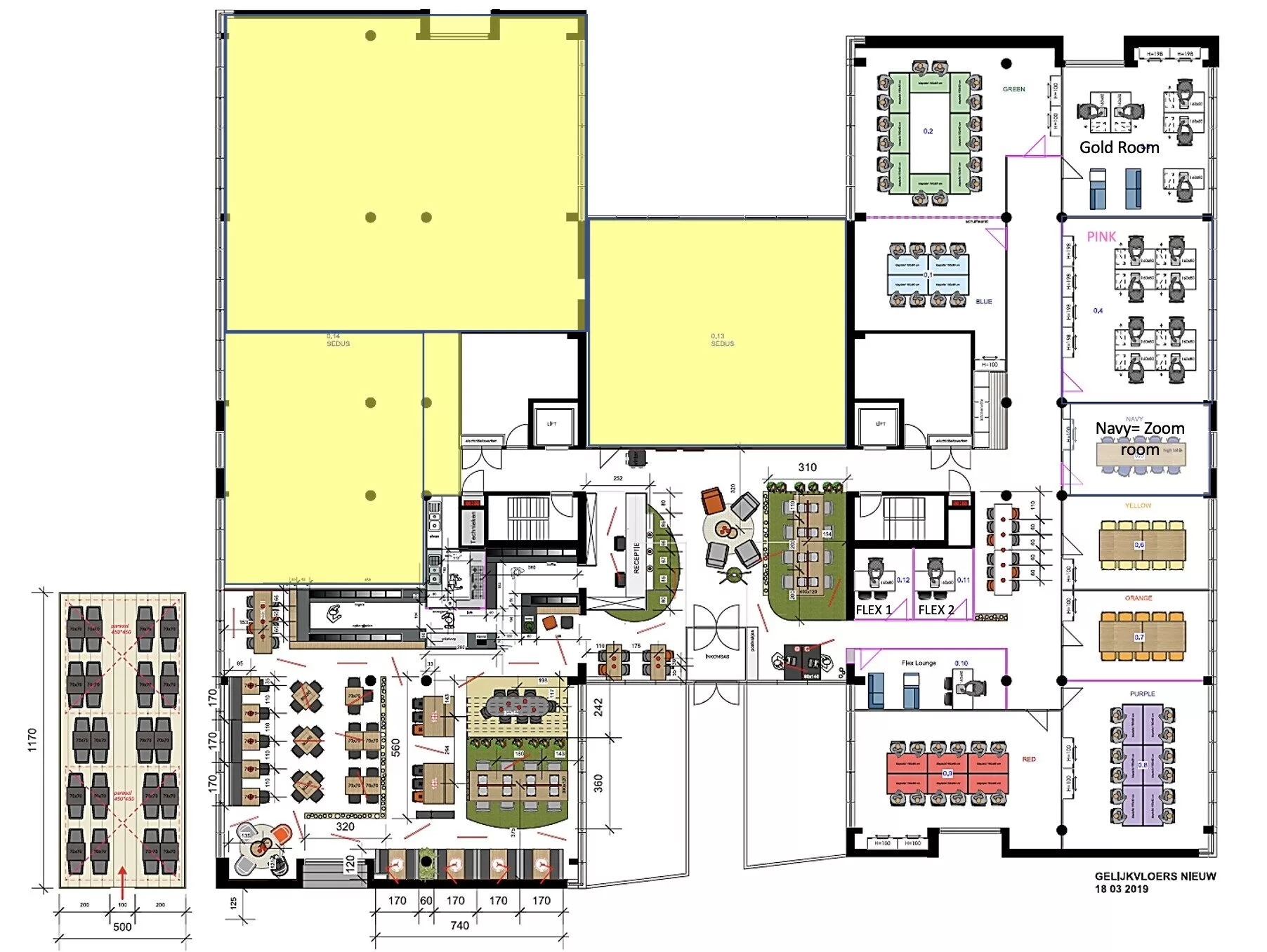
| Meeting rooms | Occupation | Internal number |
|---|---|---|
| Yellow Room (high chairs) | 8 | 9012 |
| White Room (no window) | 8 | 9014 |
| Orange Room | 10 | 9011 |
| Purple Room | 12 | 9010 |
| Black Room | 12 | 9015 |
| Pink Room | 12 | 9068 |
| Red Room | 14 | 9009 |
| Blue Room | 20 | 9020 |
| Green Room | 20 | 9013 |
| Flex 2 | 2 | 9005 |
| Flex 3 | 2 | 9006 |
| Flex 4 | 2 | 9007 |
| Flex 5 | 2 | 9008 |
| Flex 6 | 2 | 9028 |
| Flex lounge | 2 | 9018 |
You can reserve your meeting room by phone at 9001 or 9003, by email at aalst@officenter.eu, or in person at the front desk.
Catering
Catering during your meeting? You can choose between different formulas. Drinks and breaks, breakfast formulas, lunch formulas and tapas, day formula for meetings... Our Happy Client Assistants will be happy to help you with this.
Audio visual material
Remote control and cables can be borrowed at the reception desk. Beamer, speakers, microphone ... are on request. Please return borrowed equipment, after use, to the reception desk.
To allow all our customers to use our facilities we have implemented the following rules :
FAIR USE POLICY MEETING ROOMS
You can easily reserve a meeting room through our online customer portal:
https://mp.ultrasoftbis.com/mr/index/Officenter
Are you a Officenter customer?
As a Officenter customer, you’ll receive credits that you can use to reserve meeting rooms through the customer portal.
Not a Officenter customer?
Even as an external customer, you can easily reserve a meeting room through the customer portal. You can then pay for the reservation directly through the portal by invoice.
Canceling a Reservation at
Would you like to cancel a reservation? If so, please notify the relevant Officenter in a timely manner, preferably at least 24 hours in advance. We will ensure that the cancellation is processed without any loss of your credits.
Do you have any questions, or do you need assistance with registration or making a reservation? We'd be happy to help you.
News from customers
If you would like to send a mailing to Officenter customers, it’s easy to do. We will distribute your message to Officenter customers at a specific location or to all locations.
Here's how it works
Create an email with the desired description for your event or job opening in the subject line, for example: “Lunch & Learn Officenter” or “Junior Sales Position”:
Your message will be reviewed and, once approved by us, distributed via email to Officenter customers and their employees.
We have annual contracts, which are automatically renewed. If the company fails to pay the second annual invoice but still keeps its registered address with us, we must take legal action to have the address officially removed. That is why we require a 6-month security deposit.
Officenter We adhere to strict data security protocols and policies to ensure the confidentiality of customer data, in accordance with GDPR regulations. Our IT systems are designed to prevent unauthorized access, and our employees are trained to handle confidential information securely.
Yes, all of our locations are equipped with an alarm system and security measures to ensure the safety of our customers.
Outside of office hours, our locations are accessible only through an access control system. This is achieved through a combination of physical security measures, such as 24/7 access codes and alarm systems. In addition, we conduct regular physical security inspections between 10:00 p.m. and 7:00 a.m. to ensure safety and security.
Our rates are the same at all our locations. Please feel free to contact us for detailed pricing information.
The number of credits allocated to your company each month is proportional to the monthly fee and/or plan you have purchased from Officenter (e.g., permanent office, coworking space, virtual office, studio, etc.).
The specific awarding of credits will be:
Yes, Officenter has a Well-being Manager and offers free participation in a wide range of sports and wellness activities, such as monthly chair massages, running races, and monthly after-work drinks.
Our locations feature both AC charging stations for our customers and fast chargers that are accessible to the public. The AC charging stations are available exclusively to our customers after they register via a special app, and usage is billed monthly. The fast chargers are part of a public network and can be used by anyone. Payment for these fast chargers can be made on-site using a charging card or credit card.
Yes, you can request a tour by contacting the location of your choice or by emailing klantworden@officenter.eu. We’d be happy to show you our facilities and answer any questions you may have.
As a member of the Officenter community, you’ll receive invitations to networking events, sports activities, numerous networking lunches, and other activities.
The credit system is an internal point system that allows you to reserve meeting rooms, flexible workspaces, and event rooms at Officenter . Each reservation costs a certain number of credits. This ensures that available spaces are distributed fairly among all customers and that every company has an equal opportunity to use our facilities.
The credit system will take effect on January 1, 2026, for all customers who use meeting rooms, flexible workspaces, and/or event rooms at one or more Officenter locations.
The " Officenter " app and the customer portal are currently still under active development.
At launch, the following features will be available:
New features are being added step by step, such as real-time credit balance, management options, and communication features. As a result, some features may still be limited or inactive during the initial phase.
The number of credits allocated to your company each month is proportional to the monthly fee and/or plan you have purchased from Officenter (e.g., permanent office, coworking space, virtual office, studio, etc.).
The specific awarding of credits will be:
In the " Officenter " app, you'll see:
If you are not (yet) using the app, you can always ask about it at the front desk of your Officenter location.
Each room reservation costs a fixed number of credits per hour. The credit cost depends on the type of room you book:
The indicative value of 1 credit is currently set at €25.00 (excl. VAT).
In the Officenter App, you will always see the total credit cost of your reservation before confirmation.
The Officenter app is the preferred way to make a quick and easy reservation. In exceptional cases, you can also book by phone, by email, or at the front desk.
All bookings—regardless of the channel—are settled in credits in the same way.
Once you have used up all your credits for the current period, you can:
Any usage beyond your included credits is currently billed separately at 50% of the standard rate, which is €12.50 per credit (excl. VAT).
Yes. Credits are tied to a monthly or periodic basis and cannot be carried over to the next period. Unused credits automatically expire at the end of the relevant period.
Yes. The credit system applies at all Officenter locations and to all customers who are entitled to use meeting rooms, flex offices, and/or event rooms.
The credit system is set forth in a service memorandum that constitutes an integral and supplementary part of your existing agreement with Officenter. This policy applies to all current and future contracts, unless otherwise expressly agreed in writing.
You can find more detailed information about the credit system and how to use the Officenter app (coming soon) on our customer information page:
https://officenter.eu/customer-info/#credits
The customer portal is available via the website below. You can bookmark it in your web browser or add the website as an “app” to your smartphone’s home screen.
Go to:
https://mp.ultrasoftbis.com/MR/Index/Officenter
Each customer’s “first contact” (primary contact person) is added Officenter added as an administrator in the customer portal. This administrator can then add other users themselves.
Logging in for the first time? Follow these steps:
From there, you can reserve meeting rooms and flexible workspaces, view your credits, and (depending on your role) manage other users.
Yes. Within the customer portal, we use user roles. This allows you to determine who within your organization can do what in the Officenter App.
Currently, there are two roles:
A third role will be added soon:
3. Announcements role (receive notifications only)
The credit system is an internal point system that allows you to reserve meeting rooms, flexible workspaces, and event rooms at Officenter . Each reservation costs a certain number of credits. This ensures that available spaces are distributed fairly among all customers and that every company has an equal opportunity to use our facilities.
The credit system will take effect on January 1, 2026, for all customers who use meeting rooms, flexible workspaces, and/or event rooms at one or more Officenter locations.
The " Officenter " app and the customer portal are currently still under active development.
At launch, the following features will be available:
New features are being added step by step, such as real-time credit balance, management options, and communication features. As a result, some features may still be limited or inactive during the initial phase.
The number of credits allocated to your company each month is proportional to the monthly fee and/or plan you have purchased from Officenter (e.g., permanent office, coworking space, virtual office, studio, etc.).
The specific awarding of credits will be:
In the " Officenter " app, you'll see:
If you are not (yet) using the app, you can always ask about it at the front desk of your Officenter location.
Each room reservation costs a fixed number of credits per hour. The credit cost depends on the type of room you book:
The indicative value of 1 credit is currently set at €25.00 (excl. VAT).
In the Officenter App, you will always see the total credit cost of your reservation before confirmation.
The Officenter app is the preferred way to make a quick and easy reservation. In exceptional cases, you can also book by phone, by email, or at the front desk.
All bookings—regardless of the channel—are settled in credits in the same way.
Once you have used up all your credits for the current period, you can:
Any usage beyond your included credits is currently billed separately at 50% of the standard rate, which is €12.50 per credit (excl. VAT).
Yes. Credits are tied to a monthly or periodic basis and cannot be carried over to the next period. Unused credits automatically expire at the end of the relevant period.
Yes. The credit system applies at all Officenter locations and to all customers who are entitled to use meeting rooms, flex offices, and/or event rooms.
The credit system is set forth in a service memorandum that constitutes an integral and supplementary part of your existing agreement with Officenter. This policy applies to all current and future contracts, unless otherwise expressly agreed in writing.
You can find more detailed information about the credit system and how to use the Officenter app (coming soon) on our customer information page:
https://officenter.eu/customer-info/#credits
The customer portal is available via the website below. You can bookmark it in your web browser or add the website as an “app” to your smartphone’s home screen.
Go to:
https://mp.ultrasoftbis.com/MR/Index/Officenter
Each customer’s “first contact” (primary contact person) is added Officenter added as an administrator in the customer portal. This administrator can then add other users themselves.
Logging in for the first time? Follow these steps:
From there, you can reserve meeting rooms and flexible workspaces, view your credits, and (depending on your role) manage other users.
Yes. Within the customer portal, we use user roles. This allows you to determine who within your organization can do what in the Officenter App.
Currently, there are two roles:
A third role will be added soon:
3. Announcements role (receive notifications only)
Officenter updated its plans and rates. Find out which Workspace is right Workspace you